
Guida al Visual Basic .NET
Capitolo 40° - Le librerie di classi
Certe volte accade che non si voglia scrivere un programma, ma piuttosto un insieme di utilità per gestire un certo tipo di informazioni. In questi casi, si scrive una libreria di classi, ossia un insieme, appunto, di namespace, classi e tipi che servono ad un determinato scopo. Potete trovare un esempio tra i sorgenti della sezione Download: mi riferisco a Mp3 Deep Analyzer, una libreria di classi che fornisce strumenti per leggere e scrivere tag ID3 nei file mp3 (per ulteriori informazioni sull'argomento, consultare la sezione FFS). Con quel progetto non ho voluto scrivere un programma che svolgesse quei compiti, perchè da solo sarebe stato poco utile, ma piuttosto mettere a disposizione anche agli altri programmatori un modo semplice per manipolare quel tipo di informazioni. Così facendo, uno potrebbe usare le funzioni di quella libreria in un proprio programma. Le librerie, quindi, sono un inventario di classi scritto appositamente per essere riusato. Creare una nuova libreria di classiPer creare una libreria, cliccate su File > New Project e, invece si selezionare la solita "Console Application", selezionate "Class Library". Una volta inizializzato il progetto, vi troverete di fronte a un codice preimpostato diverso dal solito:Class Class1 End ClassNoterete, inoltre, che, premendo F5, vi verrà comunicato un errore: non stiamo scrivendo un programma, infatti, ma solo una libreria, che quindi non può essere "eseguita" (non avrebbe senso neanche pensare di farlo). Per fare un esempio, significativo, riprendiamo il codice di esempio del capitolo sulle interfacce e scorporiamolo dal programma, estraendone solo le classi: Namespace PostalManagement
Public Interface IIdentifiable
ReadOnly Property Id() As Int32
Function ToString() As String
End Interface
Public Class Pack
Implements IIdentifiable
Private _Id As Int32
Private _Destination As String
Private _Dimensions(2) As Single
Public ReadOnly Property Id() As Integer Implements IIdentifiable.Id
Get
Return _Id
End Get
End Property
Public Property Destination() As String
Get
Return _Destination
End Get
Set(ByVal value As String)
_Destination = value
End Set
End Property
Public Property Dimensions(ByVal Index As Int32) As Single
Get
If (Index >= 0) And (Index < 3) Then
Return _Dimensions(Index)
Else
Throw New IndexOutOfRangeException()
End If
End Get
Set(ByVal value As Single)
If (Index >= 0) And (Index < 3) Then
_Dimensions(Index) = value
Else
Throw New IndexOutOfRangeException()
End If
End Set
End Property
Public Sub New(ByVal Id As Int32)
_Id = Id
End Sub
Public Overrides Function ToString() As String Implements IIdentifiable.ToString
Return String.Format("{0:0000}: Pacco {1}x{2}x{3}, Destinazione: {4}", _
Me.Id, Me.Dimensions(0), Me.Dimensions(1), _
Me.Dimensions(2), Me.Destination)
End Function
End Class
Public Class Telegram
Implements IIdentifiable
Private _Id As Int32
Private _Recipient As String
Private _Message As String
Public ReadOnly Property Id() As Integer Implements IIdentifiable.Id
Get
Return _Id
End Get
End Property
Public Property Recipient() As String
Get
Return _Recipient
End Get
Set(ByVal value As String)
_Recipient = value
End Set
End Property
Public Property Message() As String
Get
Return _Message
End Get
Set(ByVal value As String)
_Message = value
End Set
End Property
Public Sub New(ByVal Id As Int32)
_Id = Id
End Sub
Public Overrides Function ToString() As String Implements IIdentifiable.ToString
Return String.Format("{0:0000}: Telegramma per {1} ; Messaggio = {2}", _
Me.Id, Me.Recipient, Me.Message)
End Function
End Class
Public Class MoneyOrder
Implements IIdentifiable
Private _Id As Int32
Private _Recipient As String
Private _Money As Single
Public ReadOnly Property Id() As Integer Implements IIdentifiable.Id
Get
Return _Id
End Get
End Property
Public Property Recipient() As String
Get
Return _Recipient
End Get
Set(ByVal value As String)
_Recipient = value
End Set
End Property
Public Property Money() As Single
Get
Return _Money
End Get
Set(ByVal value As Single)
_Money = value
End Set
End Property
Public Sub New(ByVal Id As Int32)
_Id = Id
End Sub
Public Overrides Function ToString() As String Implements IIdentifiable.ToString
Return String.Format("{0:0000}: Vaglia postale per {1} ; Ammontare = {2}?", _
Me.Id, Me.Recipient, Me.Money)
End Function
End Class
Public Class PostalProcessor
Public Delegate Function IdSelector(ByVal Id As Int32) As Boolean
Private _StorageCapacity As Int32
Private _NextId As Int32 = 0
Private Storage() As IIdentifiable
Public Property StorageCapacity() As Int32
Get
Return _StorageCapacity
End Get
Set(ByVal value As Int32)
_StorageCapacity = value
ReDim Preserve Storage(value)
End Set
End Property
Public Property Item(ByVal Index As Int32) As IIdentifiable
Get
If (Index >= 0) And (Index < Storage.Length) Then
Return Me.Storage(Index)
Else
Throw New IndexOutOfRangeException()
End If
End Get
Set(ByVal value As IIdentifiable)
If (Index >= 0) And (Index < Storage.Length) Then
Me.Storage(Index) = value
Else
Throw New IndexOutOfRangeException()
End If
End Set
End Property
Public ReadOnly Property FirstPlaceAvailable() As Int32
Get
For I As Int32 = 0 To Me.Storage.Length - 1
If Me.Storage(I) Is Nothing Then
Return I
End If
Next
Return (-1)
End Get
End Property
Public ReadOnly Property NextId() As Int32
Get
_NextId += 1
Return _NextId
End Get
End Property
Public Sub New(ByVal Items() As IIdentifiable)
Me.Storage = Items
_StorageCapacity = Items.Length
End Sub
Public Sub New(ByVal Capacity As Int32)
Me.StorageCapacity = Capacity
End Sub
Public Sub PrintByFilter(ByVal Selector As IdSelector)
For Each K As IIdentifiable In Storage
If K Is Nothing Then
Continue For
End If
If Selector.Invoke(K.Id) Then
Console.WriteLine(K.ToString())
End If
Next
End Sub
Public Sub PrintById(ByVal Id As Int32)
For Each K As IIdentifiable In Storage
If K Is Nothing Then
Continue For
End If
If K.Id = Id Then
Console.WriteLine(K.ToString())
Exit For
End If
Next
End Sub
Public Function SearchItems(ByVal Str As String) As Int32()
Dim Temp As New ArrayList
For Each K As IIdentifiable In Storage
If K Is Nothing Then
Continue For
End If
If K.ToString().Contains(Str) Then
Temp.Add(K.Id)
End If
Next
Dim Result(Temp.Count - 1) As Int32
For I As Int32 = 0 To Temp.Count - 1
Result(I) = Temp(I)
Next
Temp.Clear()
Temp = Nothing
Return Result
End Function
End Class
End Namespace
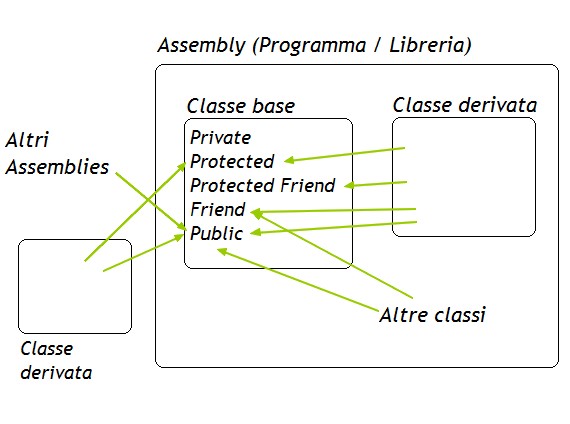
Notate che ho racchiuso tutto in un namespace e ho anche messo lo scope Public a tutti i membri non privati. Se non avessi messo Public,
infatti, i membri senza scope sarebbero stati automaticamente marcati con Friend. Suppongo vi ricordiate che Friend rende accessibile un
membro solo dalle classi appartenenti allo stesso assembly (in questo caso, allo stesso progetto): questo equivale a dire che tutti i
membri Friend non saranno accessibili al di fuori della libreria e quindi chi la userà non potrà accedervi. Ovviamente,
dato che il tutto si basa sull'interfaccia IIdentifiable non potevo precluderne l'accesso agli utenti della libreria, e allo stesso modo
i costruttori senza Public sarebbero stati inaccessibili e non si sarebbe potuto istanziare alcun oggetto. Ecco che concludiamo la
lista di tutti gli specificatori di accesso con Protected Friend: un membro dichiarato Protected Friend sarà accessibile solo ai membri
delle classi derivate appartenenti allo stesso assembly. Per ricapitolarvi tutti gli scope, ecco uno schema dove le frecce verdi indicano
gli unici accessi consentiti:
 Importare la libreria in un altro progettoUna volta compilata la libreria, al posto dell'eseguibile, nella sottocartella binRelease del vostro progetto, si troverà un file con estensione *.dll. Per usare le classi contenute in questa libreria (o riferimento, nome tecnico che si confonde spesso con i nomi comuni), bisogna importarla nel progetto corrente. Per fare questo, nel Solution Explorer (la finestra che mostra tutti gli elementi del progetto) cliccate col pulsante destro sul nome del progetto e selezionate "Add Reference" ("Aggiungi riferimento"):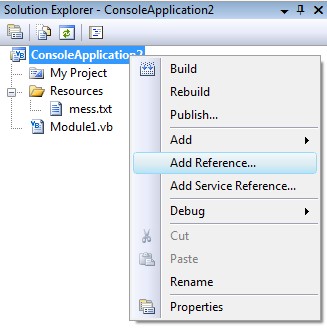 Quindi recatevi fino alla cartella della libreria creata, selezionate il file e premete OK (nell'esempio c'è una delle librerie che ho scritto e che potete trovare nella sezione Download): 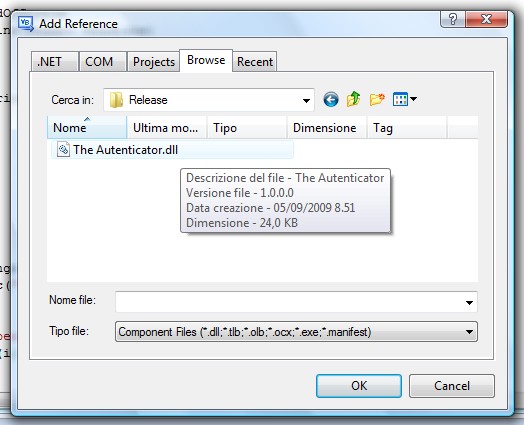 ora il riferimento è stato aggiunto al progetto, ma non potete ancora usare le classi della libreria. Prima dovete "dire" al compilatore che nel codice che sta per essere letto potreste fare riferimento ad esse. Questo si fa "importando" il namespace, con il codice: Imports [Nome Libreria].[Nome Namespace]Io ho chiamato la libreria con lo stesso nome del namespace, ma potete usare anche nomi diversi, poiché in una libreria ci possono essere tanti namespace differenti: Imports PostalManagement.PostalManagementImports è una "direttiva", ossia non costituisce codice eseguibile, ma informa il compilatore che alcune classi del sorgente potrebbero appartenere a questo namespace (omettendo questa riga, dovrete scrivere ogni volta PostalManagement.Pack, ad esempio, per usare la classe Pack, perchè altrimenti il compilatore non sarebbe in grado di trovare il name Pack nel contesto corrente). Ecco un esempio: Imports PostalManagement.PostalManagement
Module Module1
Sub Main()
Dim P As New PostalProcessor(10)
Dim Pk As New Pack(P.NextId)
P.Item(P.FirstPlaceAvailable) = Pk
'...
End Sub
End Module
che equivale a:
Module Module1

    Sub Main()
        Dim P As New PostalManagement.PostalManagement.PostalProcessor(10)
        Dim Pk As New PostalManagement.PostalManagement.Pack(P.NextId)

        P.Item(P.FirstPlaceAvailable) = Pk
        '...
    End Sub

End Module
Nella scheda ".NET" che vedete nella seconda immagine di sopra, ci sono molte librerie facenti parte del Framework che useremo nelle
prossime sezioni della guida.
C#, TypeScript, java, php, EcmaScript (JavaScript), Spring, Hibernate, React, SASS/LESS, jade, python, scikit, node.js, redux, postgres, keras, kubernetes, docker, hexo, etc...
|

