Guida al Visual Basic .NET
Capitolo 75° - Dalle relazioni agli oggetti Parte II
Aggiungere, eliminare, modificare
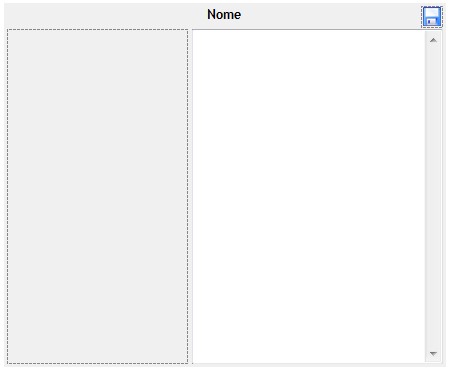
L'ultimo esempio di codice permetteva solo di scorrere elementi già presenti nel database, ma questo è davvero poco utile all'utente. Vediamo, allora, di aggiungere un po' di dinamismo all'applicazione. Volendo gestire tutto in maniera ordinata, sarebbe bello che ci fosse un controllo dedicato a visualizzare, modificare e salvare le informazioni sull'autore e uno identico per l'album. A questo scopo, possiamo scrivere dei nuovi controlli utente. Io ho scritto solo il primo, poiché il codice per il secondo è pressoché identico: Public Class AuthorViewer
Private _Author As AppDataSet.AuthorsRow
'Evento generato quando un autore viene aggiunto. Questo
'evento si verifica se l'utente salva dei cambiamenti
'quando la proprietà Author è Nothing.
'Non potendo modificare una riga esistente, quindi, ne
'viene creata una nuova. Poich, tuttavia, questo
'autore deve essere associato alla canzone, bisogna che
'qualcuno ponga l'ID della nuova riga nel campo
'Author della canzone opportuna e, dato che questo
'controllo non può n logicamente né
'praticamente arrivare a fare ciò, bisogna che
'qualcun altro se ne occupi.
Public Event AuthorAdded As EventHandler
Public Property Author() As AppDataSet.AuthorsRow
Get
Return _Author
End Get
Set(ByVal value As AppDataSet.AuthorsRow)
If value IsNot Nothing Then
_Author = value
With value
lblName.Text = .Name
If Not .IsImageNull() Then
imgAuthor.ImageLocation = .Image
Else
imgAuthor.ImageLocation = Nothing
End If
If Not .IsDescriptionNull() Then
txtDescription.Text = .Description
Else
txtDescription.Text = ""
End If
End With
Else
lblName.Text = "Nessun nome"
imgAuthor.ImageLocation = Nothing
txtDescription.Text = ""
End If
imgSave.Visible = False
End Set
End Property
Private Sub imgAuthor_Click(ByVal sender As System.Object, ByVal e As System.EventArgs) Handles imgAuthor.Click
'FOpen è un OpenFileDialog dichiarato nel designer.
'Questo codice serve per caricare un'immagine da disco
'fisso
If FOpen.ShowDialog = DialogResult.OK Then
imgAuthor.ImageLocation = FOpen.FileName
imgSave.Visible = True
End If
End Sub
'L'immagine del floppy diventa visibile solo quando c'è stata
'una modifica, ossia è stato cambiato uno di questi
'parametri: nome, immagine, descrizione.
Private Sub txtDescription_TextChanged(ByVal sender As System.Object, ByVal e As System.EventArgs) Handles txtDescription.TextChanged
imgSave.Visible = True
End Sub
Private Sub lblName_Click(ByVal sender As System.Object, ByVal e As System.EventArgs) Handles lblName.Click
Dim NewName As String = InputBox("Inserire nome:")
If Not String.IsNullOrEmpty(NewName) Then
lblName.Text = NewName
imgSave.Visible = True
End If
End Sub
Private Sub imgSave_Click(ByVal sender As System.Object, ByVal e As System.EventArgs) Handles imgSave.Click
If _Author Is Nothing Then
'Crea la nuova riga e la inserisce nel dataset
'principale. Notare che questo approccio non è
'il migliore possibile, poich è sempre
'consigliabile rendere il codice il più generale
'possibile, e limitare i riferimenti agli altri form.
'Sarebbe stato più utile rendere AppDataSet
'visibile all'intero progetto mediante un
'modulo pubblico.
_Author = My.Forms.Form1.AppDataSet.Authors.AddAuthorsRow(lblName.Text, "", txtDescription.Text, imgAuthor.ImageLocation)
'Genera l'evento AuthorAdded
RaiseEvent AuthorAdded(Me, EventArgs.Empty)
Else
_Author.Name = lblName.Text
_Author.Description = txtDescription.Text
_Author.Image = imgAuthor.ImageLocation
End If
imgSave.Visible = False
End Sub
End Class
E questa è l'interfaccia:
Imports MySql.Data.MySqlClient

Public Class Form1

    Private Sub Form1_Load(ByVal sender As System.Object, ByVal e As System.EventArgs) Handles MyBase.Load
        Dim Conn As New MySqlConnection("Server=localhost; Database=appdata; Uid=root; Pwd=root;")
        Dim Adapter As New MySqlDataAdapter

        Conn.Open()

        Adapter.SelectCommand = New MySqlCommand("SELECT * FROM Songs;", Conn)
        Adapter.Fill(AppDataSet.Songs)

        Adapter.SelectCommand = New MySqlCommand("SELECT * FROM Authors;", Conn)
        Adapter.Fill(AppDataSet.Authors)

        Adapter.SelectCommand = New MySqlCommand("SELECT * FROM Albums;", Conn)
        Adapter.Fill(AppDataSet.Albums)

        Conn.Clone()
    End Sub

    Private Sub lstSongs_SelectedIndexChanged(ByVal sender As System.Object, ByVal e As System.EventArgs) Handles lstSongs.SelectedIndexChanged
        If lstSongs.SelectedIndex < 0 Then
            Exit Sub
        End If

        Dim S As AppDataSet.SongsRow = AppDataSet.Songs.FindByID(lstSongs.SelectedValue)

        lblName.Text = S.Title

        tabAuthor.Tag = Nothing
        If Not S.IsAuthorNull() Then
            Dim Authors() As AppDataSet.AuthorsRow = S.GetAuthorsRows()

            'Imposta la proprietà Author del controllo avAuthor,
            'che non è altro che un'istanza di AuthorViewer,
            'il controllo utente creato poco fa
            If Authors.Length > 0 Then
                Dim Author As AppDataSet.AuthorsRow = Authors(0)
                avAuthor.Author = Author
            Else
                avAuthor.Author = Nothing
            End If
        End If

        tabAlbum.Tag = Nothing
        If Not S.IsAlbumNull() Then
            Dim Albums() As AppDataSet.AlbumsRow = S.GetAlbumsRows()

            If Albums.Length > 0 Then
                Dim Album As AppDataSet.AlbumsRow = Albums(0)

                lblAlbumName.Text = Album.Name
                If Not Album.IsYearNull() Then
                    lblAlbumYear.Text = Album.Year
                Else
                    lblAlbumYear.Text = ""
                End If
                If Not Album.IsImageNull() Then
                    imgAlbum.Image = Image.FromFile(Album.Image)
                Else
                    imgAlbum.Image = Nothing
                End If
                If Not Album.IsDescriptionNull() Then
                    txtAlbumDescription.Text = Album.Description
                Else
                    txtAlbumDescription.Text = ""
                End If
                tabAlbum.Tag = Album.ID
            End If
        End If
    End Sub

    Private Sub btnSearch_Click(ByVal sender As System.Object, ByVal e As System.EventArgs) Handles btnSearch.Click
        If Not String.IsNullOrEmpty(txtSearch.Text) Then
            SongsBindingSource.Filter = String.Format("title like '%{0}%'", txtSearch.Text)
        Else
            SongsBindingSource.Filter = ""
        End If
    End Sub

    Private Sub avAuthor_AuthorAdded(ByVal sender As System.Object, ByVal e As System.EventArgs) Handles avAuthor.AuthorAdded
        If lstSongs.SelectedIndex < 0 Then
            Exit Sub
        End If

        Dim S As AppDataSet.SongsRow = AppDataSet.Songs.FindByID(lstSongs.SelectedValue)
        'Imposta il campo Author della canzone corrente
        S.Author = avAuthor.Author.ID
    End Sub

    Private Sub Form1_FormClosing(ByVal sender As System.Object, ByVal e As System.Windows.Forms.FormClosingEventArgs) Handles MyBase.FormClosing
        Dim Conn As New MySqlConnection("Server=localhost; Database=appdata; Uid=root; Pwd=root;")
        Dim Adapter As New MySqlDataAdapter

        'Un oggetto di tipo CommandBuilder genera automaticamente
        'tutti le istruzioni update, INSERT IGNORE e delete che servono
        'a un adapter per funzionare. Tali istruzioni vengono
        'generate relativamente alla tabella dalla quale si stanno
        'caricando i dati
        Dim Builder As MySqlCommandBuilder

        Conn.Open()

        Adapter.SelectCommand = New MySqlCommand("SELECT * FROM Songs;", Conn)
        Builder = New MySqlCommandBuilder(Adapter)
        Adapter.Update(AppDataSet.Songs)

        Adapter.SelectCommand = New MySqlCommand("SELECT * FROM Authors;", Conn)
        Builder = New MySqlCommandBuilder(Adapter)
        Adapter.Update(AppDataSet.Authors)

        Adapter.SelectCommand = New MySqlCommand("SELECT * FROM Albums;", Conn)
        Builder = New MySqlCommandBuilder(Adapter)
        Adapter.Update(AppDataSet.Albums)

        Conn.Clone()
    End Sub
End Class
C#, TypeScript, java, php, EcmaScript (JavaScript), Spring, Hibernate, React, SASS/LESS, jade, python, scikit, node.js, redux, postgres, keras, kubernetes, docker, hexo, etc...
|